Future state vision
Updated on Thursday, March 22, 2020
a strategy method to envision the concrete, future state where you want your strategy to lead
Overview
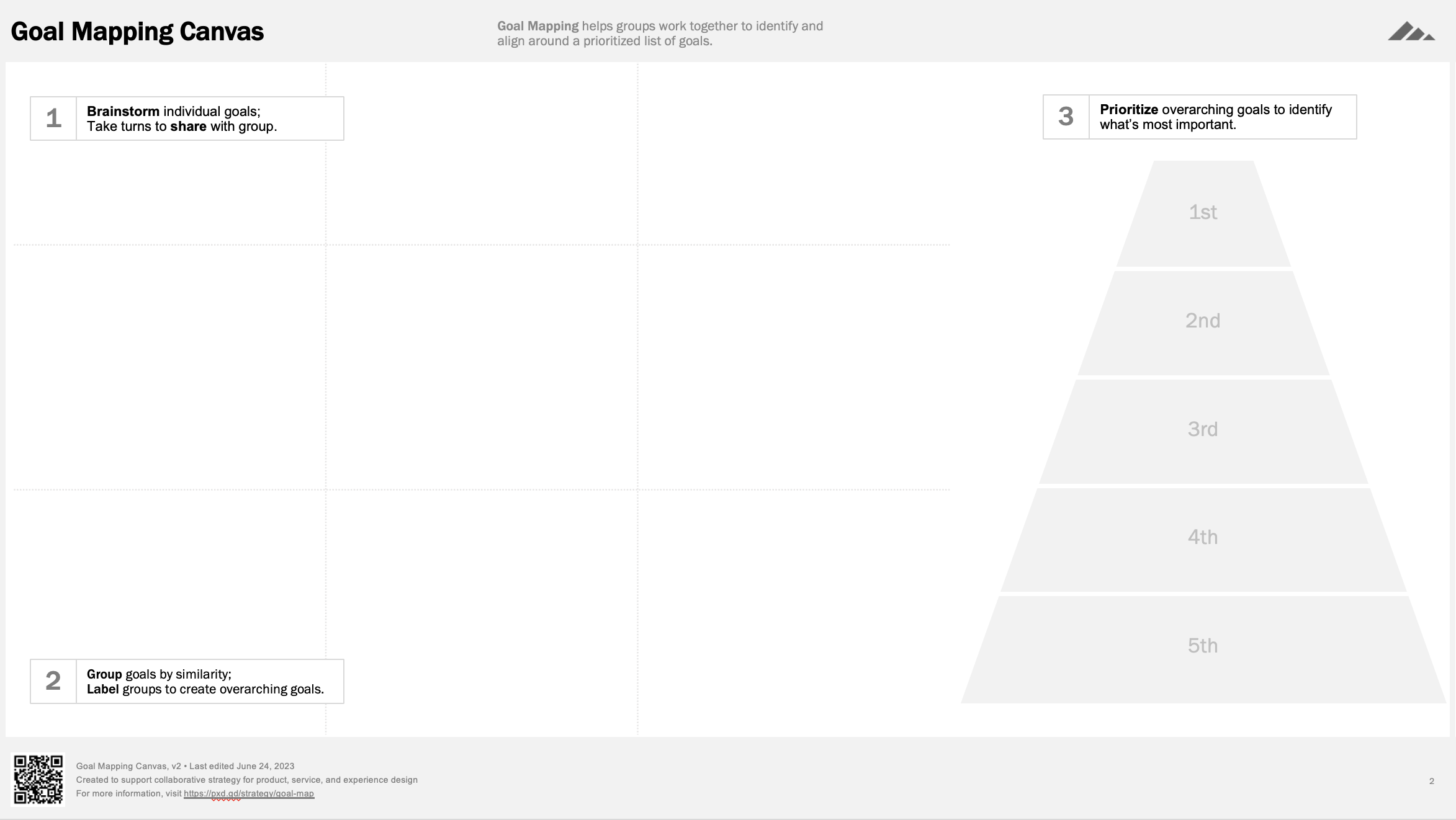
Goal Mapping helps teams identify, discuss, and prioritize a shared set of goals for a project, department, or organization. It surfaces unspoken assumptions about what's important, builds alignment through discussion, and produces a ranked list of goals the team can use to make decisions going forward.
| Difficulty | Anyone can do this |
|---|---|
| Participants | Up to 12. For more than 12, split into separate groups. |
| Time | 30 minutes (in-person), 45 minutes (remote) |
| Materials | Standard materials: something collect with and somewhere to collect them |
Expected outcomes
- A list of all individual goals generated by participants
- A set of higher-level goal "themes" created by grouping individual goals by similarity
- A prioritized list of 3–5 overarching goals the team agrees on
Prerequisites
- No prior activities required. Goal Mapping can start from a blank slate.
- Optional: Pre-collect goals from participants before the session (via survey or async input) if you want to seed the brainstorm or save time. If you pre-collect, skip or shorten Step 1.
When to Use / When to Substitute
Best used when
- Kicking off any new project or initiative. Teams typically assume they share the same goals. They usually don't. Goal Mapping reveals the gaps before they become problems.
- Aligning new or cross-functional teams. Especially useful when members come from different departments or organizations, where goals often reflect unspoken assumptions tied to each group's priorities.
- You need quick, high-level strategy. Full strategy work can take weeks. Goal Mapping generates a "good enough" prioritized direction to start making decisions now — useful for a project team or a room of executives at a kickoff.
- Establishing shared decision-making criteria. The prioritized goal list becomes a reference point for future trade-off decisions throughout the project.
Not recommended when
- The team already has well-established, validated goals. Running Goal Mapping when goals are already set and agreed upon wastes time and can feel performative.
- You need to define what you are not trying to accomplish. Goal Mapping only surfaces what people want. It does not surface anti-goals.
- You need concrete, scenario-level specificity. Goal Mapping produces high-level directional goals, not detailed future-state descriptions.
Substitute activities
- Goals and Anti-Goals — Use when you need to explicitly define what is out of scope alongside what's in scope. Helps teams draw boundaries, not just set direction.
- Future State Vision (Idealized Design) — Use when you need goals articulated as concrete future events or scenarios rather than abstract priorities. Better for teams that need to envision the end state, not just rank goals.
Variations
- Async-first hybrid: Have participants brainstorm goals asynchronously (via survey or shared doc) 1–2 days before the session. Use session time only for grouping, naming, and prioritizing. Saves ~10 minutes and gives introverts more time to think.
- Large group (12+): Split into groups of 4–6. Each group brainstorms, groups, and names independently. Then bring all groups together to merge their overarching goals and prioritize as one team.
- Executive / time-constrained (30 min): Pre-collect goals. Start at Step 2 (grouping). Compress naming and prioritizing into a single discussion.
- Pyramid ranking instead of stack ranking: Instead of a strict 1-through-N order, use tiers (Must have / Should have / Nice to have). Faster and reduces arguments over adjacent rankings.
Setup, templates, and downloads
Templates and downloads
Download templates and framing material
future-state-vision.pptx (88.27 kB). Last modified 12/01/19
 Download
In-person supplies
- Sticky notes (one pad per participant, ideally square format)
- Markers (one per participant — thick enough to read from a distance)
- A large wall, whiteboard, or butcher paper for grouping and prioritizing
- Printed or projected facilitation slides from the Goal Mapping deck (slides 3–8)
- Optional: dot stickers for voting during prioritization
Remote supplies
- Mural, Miro, or FigJam board with the Goal Mapping canvas template
- Video call with screen sharing enabled
- The Goal Mapping facilitation deck for screen sharing (slides 3–8)
- Optional: the "Copy Board" slides (slides 13–14) if using PowerPoint as a live capture surface instead of a digital whiteboard
Room / environment setup
- In-person: Arrange seating in cabaret style (small groups around tables) facing a shared wall or board. Post the Goal Mapping canvas on the wall before participants arrive.
- Remote: Pre-load the digital whiteboard with the Goal Mapping canvas. Test screen sharing. Have the facilitation slides ready in a separate window.
Facilitator prep checklist
- [ ] Review the full facilitation deck (slides 1–8) to internalize the flow
- [ ] Set up the canvas (physical wall or digital board) with three zones: brainstorm area, grouping area, and prioritization area
- [ ] Prepare the prompt sentence: "We want to ___."
- [ ] If pre-collecting goals, gather inputs and have them ready to place on the board
- [ ] Decide on prioritization method: stack ranking (ordered list) or pyramid ranking (tiers)
- [ ] Test all technology: projector, screen share, digital whiteboard access for participants
Step-by-Step Facilitation Instructions
Each step follows a Frame → Script → Facilitate → Finish → Tips structure. Frame and Script support prep reading; all sections are designed to be scanned quickly during live facilitation.
Step 1: Brainstorm individual goals — 10 minutes
Frame
Explain the purpose: "We want to understand everyone's project goals, so we can agree on what's most important." Tell participants they will work individually to brainstorm 3–5 goals. Goals can be personal, departmental, or organizational. Give the prompt: Complete this sentence — "We want to ___."
Script
"Each of us is going to list 3 to 5 goals we think are important. These can be your personal goals, goals for your department, or goals for the organization. To capture each goal, complete this sentence: 'We want to blank.' Write one goal per sticky note. You have 5 minutes, then we'll each share what we wrote."
Facilitate
- Participants work silently and individually. One goal per sticky note.
- After ~5 minutes of writing, go around the group and have each person share their goals aloud, one at a time, placing each sticky note on the board as they share.
- Do not discuss, evaluate, or debate goals during sharing. Just capture and listen.
Finish
Acknowledge the volume: "We now have [X] goals on the board from everyone. Next, we'll look for patterns."
Tips & Prompts
- If participants write goals that are really tasks or features (e.g., "We want to build a dashboard"), redirect: "That sounds like a solution. What goal would that dashboard help us achieve?"
- If goals are too vague (e.g., "We want to be successful"), push: "Successful at what? Can you make that more concrete?"
- Silent individual work first prevents dominant voices from anchoring the group's thinking and gives introverts equal footing.
- Additional prompts to spark thinking: "What would make this project a success in your eyes?" / "What would disappoint you if we didn't accomplish it?"
Step 2: Group goals by similarity — 10 minutes
Frame
Explain the purpose: "Together, we generated many goals. Let's group them by similarity so we can identify common themes." This is a collaborative activity — everyone participates in moving and grouping.
Script
"Now we're going to work together to group these goals by similarity. Look for goals that are saying similar things and move them next to each other. As you group, ask yourselves: can we combine any small groups? Should we split any large groups?"
Facilitate
- Work as a group. Participants discuss and physically move sticky notes into clusters of similar goals.
- Guide with two questions:
- "Can we combine any two small groups into one group?"
- "Can we split any large groups into two or more smaller groups?"
- Let participants drive the grouping. Step in only if the group stalls or if one person is dominating.
- Aim for 3–7 groups. Fewer than 3 means groups are too broad; more than 7 means they're too granular.
Finish
Confirm: "We've identified [X] groups. Let's name them."
Tips & Prompts
- If you end up with 8+ groups, ask: "Are any of these groups saying roughly the same thing? Can we combine two?"
- Get people physically moving. In-person, have everyone stand at the wall. Remote, give everyone edit access and encourage simultaneous dragging.
- Additional prompts: "Are these two goals saying the same thing, or are they different?" / "What's the common thread here?"
Step 3: Name groups to create overarching goals — 10 minutes
Frame
Explain the purpose: "We've grouped everyone's goals to identify common themes. Let's name each group so we can identify overarching goals we all agree on." The name should encompass all the individual goals in that group. Use the same prompt format: "We want to ___."
Script
"For each group, we need to come up with an overarching goal that captures everything in that group. Use the same format: 'We want to blank.' This overarching goal should be big enough to cover all the goals underneath it."
Facilitate
- Work through groups one at a time. For each group, ask the team to propose a name.
- The overarching goal should be broad enough to encompass all goals in the cluster but specific enough to be meaningful.
- Write the overarching goal on a new sticky note (different color if possible) and place it as the label for that group.
- If the team struggles to name a group, it may need to be split into two groups. Flag this and move on — you can return to it.
Finish
Read back all overarching goals aloud. Confirm: "These are our shared goals. Next, we'll prioritize them."
Tips & Prompts
- If energy drops during naming, work through the easiest/most obvious group first to build momentum before tackling ambiguous ones.
- Additional prompts: "If you had to explain this group to someone not in the room, what would you say?" / "What's the one thing all these goals have in common?"
Step 4: Prioritize overarching goals — 15 minutes
Frame
Explain the purpose: "Now that we've identified several overarching goals, we'll prioritize them from most to least important, so we can use the goals to help us make decisions." The key question: "If we could afford to achieve only one goal, what would it be?"
Script
"We have [X] overarching goals. Now we need to put them in order. Here's the question: if we could only achieve one of these goals, which one would it be? Let's start there."
Facilitate
- Use stack ranking: have the group order goals from most important (1st) to least important.
- Start from the top: "What is the single most important goal?" Discuss until the group agrees, then place it at the top.
- Then ask: "What is the least important goal?" Place it at the bottom.
- Work inward from both ends to fill in the middle ranks.
- If consensus stalls, use dot voting: give each participant 3 dots to vote on their top goals. Use vote counts to break ties, then discuss final order.
Finish
Read the prioritized list from top to bottom. Confirm agreement: "Does this order represent what we, as a team, think is most important?"
Recap the full accomplishment: "We started with [X] individual goals, found common themes, and agreed on a prioritized list of [Y] shared goals. This list will help us make product and project decisions going forward."
Tips & Prompts
- If the group can't agree on priority order, switch to dot voting to break the logjam. Use votes as a starting point, then discuss the top 2–3.
- Start with the extremes (most and least important) — these are usually the easiest calls and give the group early wins before tackling the contested middle.
- Additional prompts: "If these two goals conflict, which one wins?" / "Which of these goals would have the biggest impact if we achieved it?"
What to Do Next
Share outputs with participants
Within 24 hours of the session, share a summary with all participants that includes the prioritized goal list, photos or screenshots of the board, and any notes captured during discussion. This serves as a record of what the group decided and makes it easy for participants to share alignment with stakeholders who weren't in the room.
Use the prioritized goals as decision-making criteria
The goal list is a tool, not a document to file. Reference it explicitly during future discussions: "Does this decision support our #1 goal?" Use it to evaluate trade-offs, scope decisions, and resource allocation. Post it visibly in the team's workspace (physical or digital) so it stays present.
Feed goals into downstream activities
- Business Landscape Canvas — Goal Mapping outputs plug directly into Section 1 of the BLC. If you plan to run a BLC, pre-populate the Goals section with these outputs and skip that section entirely.
- Future State Vision (Idealized Design) — Use the prioritized goals to frame the visioning exercise: "Given that our top goal is [X], what does success look like?"
- Project brief or charter — Incorporate the prioritized goals into the project brief as the team's agreed-upon objectives.
- OKRs or success metrics — Translate each overarching goal into measurable key results. The goals provide the "O"; the team still needs to define the "KRs."
Learn more

Facilitation tips and instructions
Austin Govella provides detailed instructions and facilitation tips for Future State Vision in his book, Collaborative Product Design.
Austin Govella derived Future State Vision from a systems thinking approach to innovation called Idealized Design formalized by Russel Ackoff.
The origin of idealized design
Ackoff observed idealized design in action at Bell Labs in the 1950s. You can read or listen to the story on the Wharton School of Business’s blog, Knowledge@Wharton: How Bell Labs Imagined — and Created — the Telephone System of the Future.
Learn about idealized design
Russel Ackoff, Jason Magidson, and Herbert Addison dive deeply into Idealized Design in the book of the same name.
