User target (bullseye canvas) v.2.2
Updated on Monday, July 20, 2026
A method that helps teams identify a prioritized list of everyone your system touches in 20 minutes. Includes templates and facilitation guide.
Overview
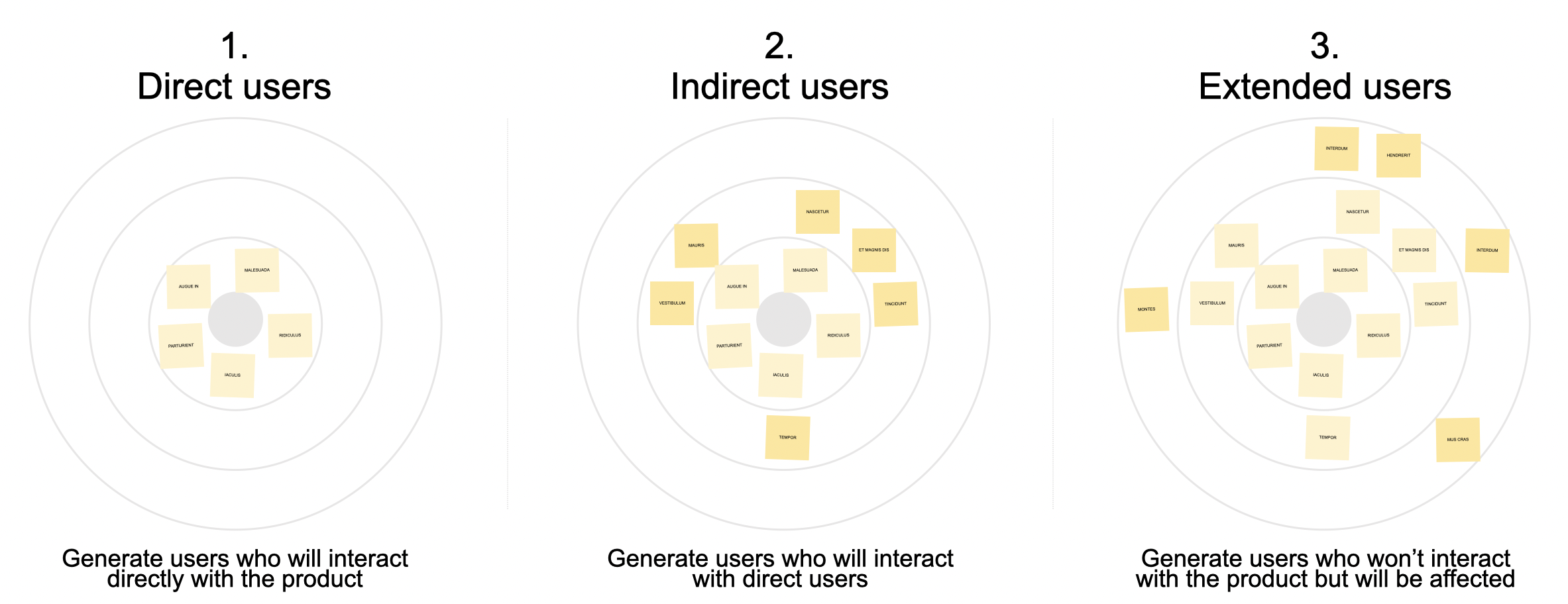
Most user generation focuses on users who directly interact with a product. The bullseye canvas helps teams focus on and identify the people direct users will communicate and collaborate with (indirect users), as well as extended users who may be affected by the product. You'll run three five-minute brainstorms: direct users, indirect users, then extended users. It produces a list of users and works for products, services, or systems for projects that are green field, redesigns, or retrofits.
| Objective | Understand |
|---|---|
| Model | Users & personas |
| Difficulty | Anyone can run |
| Participants | Up to 24 |
| Time | 20m |
| Materials | Sticky notes and a canvas, wall you can draw on, or easel pad |
Expected outcomes
- A list of users to design for
- A list of users affected by the design to keep in consideration
- A list of users to deprioritize
Prerequisites
- No inputs required. The user bullseye can start from a blank slate.
- Optional: Generate a list of users ahead of time and pre-populate the canvas.
When to Use / When to Substitute
Best used when
- Kicking off any new project or initiative. User Bullseye aligns teams around the users they should design for and what users to ignore.
- Starting journey mapping or touchpoint flows. We often think of direct users when we map journeys, but indirect users reveal how experiences are shared, communicated, and negotiated with others. The User Bullseye exposes all the various people who should be considered on your journey map.
- You discover a new direct or indirect user during a project. Sometimes a new user will surprise you. When you encounter a user you didn't have on your radar, take advantage of the moment to run this method and validate your understanding of your users.
Not recommended when
- The team already has well-established, validated users. Running User Bullseye when a project is well-established and users are assumed to be known risks pushback from people who feel you're retreading settled ground.
- Your project has a very limited scope. If your project has a limited scope and minor overall footprint, you can assume that the direct and indirect users will be minimal and can skip a deeper analysis.
- You have more than 24 participants. This activity doesn't do well separated into groups and brought back together. For larger groups, do this activity with a smaller group beforehand and reserve the room time for presenting and validating the results.
Substitute activities
- User Brainstorm — Use when you only need a general list of users and don't need to understand indirect users.
- Stakeholder Mapping — Use when the specific relationships between users need to be mapped and understood.
Variations
- Async-first hybrid: Have participants share users asynchronously (via survey or shared doc) 1–2 days before the session. Use session time only for indirect and extended users. Saves ~10 minutes and gives introverts more time to think.
- Groups larger than 24 people: For larger groups, do this activity with a smaller group beforehand and reserve the room time for presenting and validating the results.
- Groups of executives: Like with large groups, do this activity with a smaller group beforehand and reserve the room time for presenting and validating the results with leadership.
Setup, templates, and downloads
Templates and downloads
Download User bullseye canvas templates and facilitation guide
user-bullseye-canvas.pptx (62.31 kB). Last modified 06/27/20
 Download
User Bullseye canvas template (Mural)
Use Mural templateIn-person supplies
- Sticky notes for the collector (they'll capture everything and post it on the board)
- Markers (one per participant — thick enough to read from a distance)
- A whiteboard, easel pad, or butcher paper for gathering sticky notes
- Printed or projected facilitation slides from the User Bullseye deck (slides 3–8)
Remote supplies
- Mural, Miro, or FigJam board with the User Bullseye canvas template
- Video call with screen sharing enabled
- The User Bullseye facilitation deck for screen sharing (slides 3–8)
- Optional: the "Copy Board" slide (slide 2) if using PowerPoint as a live capture surface instead of a digital whiteboard
Room / environment setup
- In-person: Arrange seating in a U-shape (tables arranged in a U, open end facing a shared wall or board). Post the User Bullseye canvas on the wall before participants arrive.
- Remote: Pre-load the digital whiteboard with the User Bullseye canvas. Test screen sharing. Have the facilitation slides ready in a separate window.
Facilitator prep checklist
Prep time 30 minutes
- [ ] Review the full facilitation deck (slides 3–8) to internalize the flow
- [ ] Set up the canvas (physical wall or digital board) with three concentric circles
- [ ] If pre-collecting users, gather inputs and have them placed on the board
- [ ] Test all technology: projector, screen share, digital whiteboard access for participants
Step 1: Brainstorm direct users
5 minutes
Frame
Usually, the people who interact directly with the product are the most important users. In this activity, you will work all together to brainstorm the system's users.
Script
"Let's identify the system's users, so we can optimize the experience for the right people. We want to list people who will directly interact with the system and its interfaces. You brainstorm the user, and I'll capture them on the board."
Facilitate
- Ask everyone: "Who will interact with and use the system?"
- Participants take turns naming a user.
- The facilitator collects each user on a sticky note, one note per user.
- The facilitator places each user in the second circle of the bullseye canvas (the first, inner circle represents the system)
Finish
Acknowledge the volume and transition to the next step: "We now have [X] direct users on the board. Let's move on to the next circle of the canvas and talk about users who talk to or work with the direct users."
Tips & Prompts
- Always probe for other direct users. Teams often focus on one user and ignore others.
- If participants identify people you believe aren't direct users, probe to understand what the users do with the product. Team members may identify unexpected ways users interact with the product.
- Rarely, new teams won't know the system's or a new product's users, so you can't go any further. Pivot and create a concrete future vision instead.
Step 2: Brainstorm indirect users
5 minutes
Frame
In this activity, you will work all together to generate a list of indirect users who work with and talk to the direct users. This helps the team understand how to optimize the product to support how direct users will use it.
Script
"Now that we know who will use the system, let's look at who they collaborate with, so we can make it easy for our users to get their jobs done. We want to list anyone our users talk to or work with."
Facilitate
- Ask everyone: "Who will our users talk to or work with while they use our product?"
- Participants take turns naming an indirect user.
- The facilitator collects each user on a sticky note, one note per user.
- The facilitator places each user in the third circle of the bullseye canvas
Finish
Acknowledge the volume and transition to the next step: "We've identified [X] indirect users. Let's move on to the next circle of the canvas and talk about anyone who might be affected by what direct users do with the product."
Tips & Prompts
- Trigger questions to identify additional indirect users:
- Who do users talk to while using the product?
- Do users share information with anyone?
- Does someone else review or approve what users do or choose?
- Who do your users work with?
- Who watches them while they use the product?
- Who do they report to?
- Who provides information users need while using the product?
Step 3: Brainstorm extended users
5 minutes
Frame
In this activity, you will work all together to generate a list of extended users who do not interact with the product, but may still be affected by the product. This helps the team avoid unintended consequences that may run counter to the project's goals.
Script
"We have a good idea about who will use the product, as well as who they talk to and work with. Now let's look for anyone else who may be affected."
Facilitate
- Ask everyone: "Who may be affected by our system?"
- Participants take turns naming an extended user
- The facilitator collects each user on a sticky note, one note per user
- The facilitator places each user outside the third circle of the bullseye canvas
Finish
Acknowledge the results and wrap the activity: "We've done a great job identifying all the people impacted by our system, including its users as well as others who are impacted. We can use this information to make sure we optimize the system the right way for the right people."
Tips & Prompts
- Probe for policies or processes that may affect people. Many unintended consequences stem not from the product but from policies, processes, or outcomes triggered by direct and indirect users.
What to Do Next
Share outputs with participants
Within 24 hours of the session, share a summary with all participants that includes the list of direct users, the list of indirect users and how they are impacted by direct users, and the list of extended users and how they are impacted by the system or its users. Include photos or screenshots of the board, and any notes captured during discussion. This serves as a record of what the group discovered and makes it easy for participants to share alignment with stakeholders who weren't in the room.
Feed users into downstream activities
- Journey Mapping — The list of direct and indirect users plugs directly into a good journey map or service blueprint.
- User Models and Personas Prioritization — Before you go off and make user models and personas, put your list of direct users into a user prioritization exercise to uncover what users really are most important.
Learn more

Collaborative Product Design by Austin Govella
Chapter ten provides detail on variations and alternatives for using this method.
Facilitation tips and instructions
Austin Govella provides detailed instructions and facilitation tips for the User Target in chapter 10 of his book, Collaborative Product Design. You can view chapter 10 online via O’Reilly’s Safari Books.
Explore more from Users & personas
method
User attribute grid 2.0
For a group of users, this method captures all useful data points and allows comparison, synthesis, and identification of unique, similar, primary, and secondary user models.
Updated 11 days ago.
method
User profile canvas
For a single user, understand tasks, contexts, pains, gains, and goal or job-to-be-done.
Updated 14 days ago.
